Say it your way.
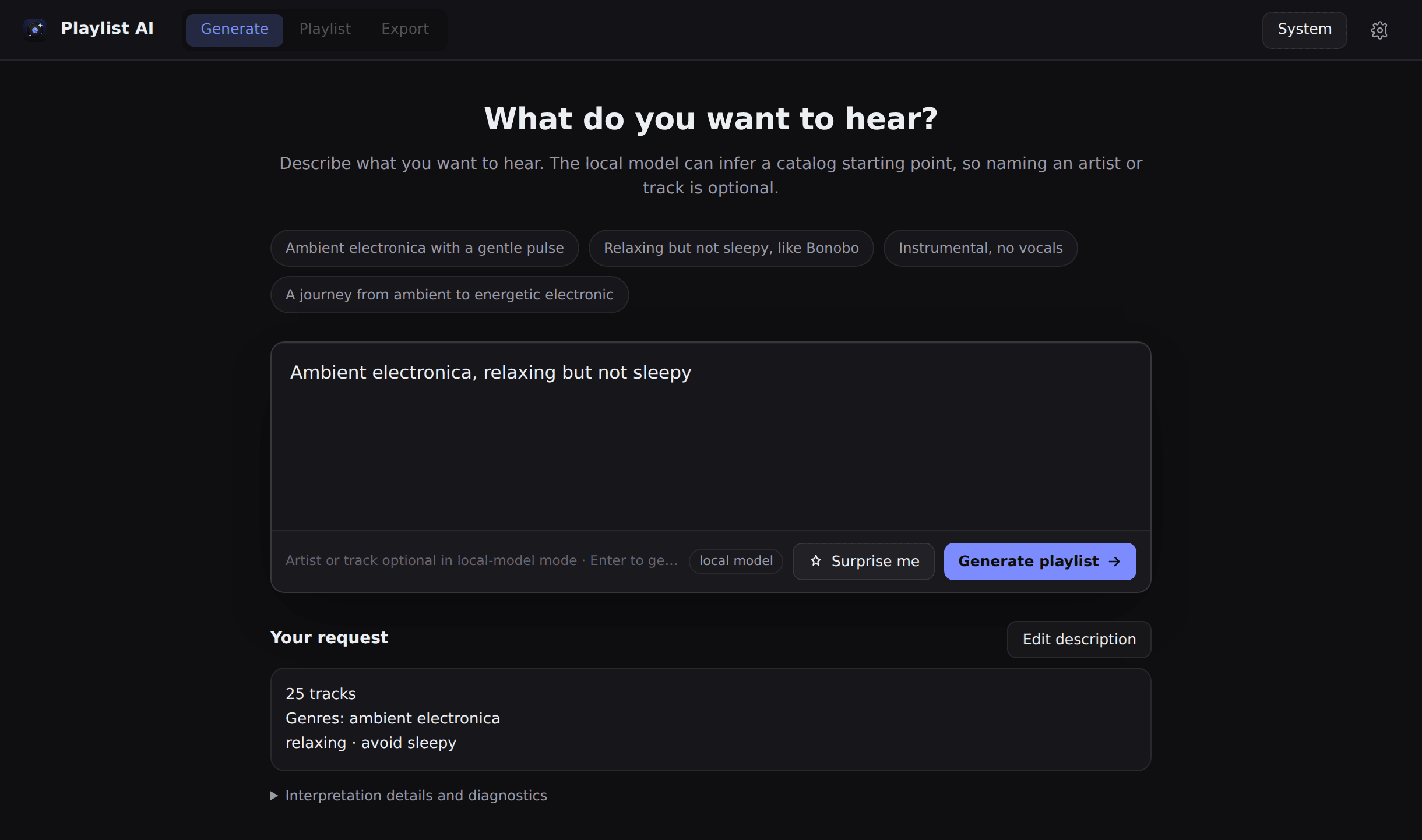
Describe the sound you’re after, from genre and mood to the artists you love. Add the things you’d rather leave out.
Christian Löffler.
Warm, but not sleepy.”AN IDEA FOR YOUR NEXT REQUEST
A feeling, a favorite artist, a place to start.
Turn a few words into your next playlist.
Free & open source · Windows, macOS & Linux
Generate screen · Earlier desktop version shown
Evidence-aware recommendations
Your taste stays private
No account required
01 / START WITH A FEELING
For the quiet hours. For one more mile. For finding something that feels like an old favorite. Give your next playlist a little direction.
Describe the sound you’re after, from genre and mood to the artists you love. Add the things you’d rather leave out.
Start with Nine Inch Nails. End with Marilyn Manson. Ask for those artists at the endpoints, with similar tracks connecting the two.
Ask for a duration as well as a sound. A focused afternoon, a workout, a long way home—the time is part of the request.
Targets use known track lengths. If the timing cannot be met, the app tells you.
Preview available tracks, choose what to keep and return to saved playlists. Export a CSV or continue through Soundiiz to transfer your selection.
02 / THE LATEST PRESSING
0.15.0 OUT NOWVersion 0.15.0 takes care of the details: safer updates, smoother startup and playlists that stay true to your direction. From the first setup to your next export, everything feels more connected.
Read the 0.15.0 release notes Explore all changes since v0.14.2 ↗Windows installers detect blocked replacements, and the updated app checks that the new version is installed. Catalog and runtime downloads are verified before they take their place.
Audio checks run in the background while the app gets ready. Setup checks what is already installed, reuses compatible assets and guides you through every required component.
Required stops stay in order, reference tracks reach audio similarity analysis, and your latest feedback carries through. Choose Enhanced Hybrid or Deej-AI only.
Exports keep their selection and progress as you move between screens. Saved playlists load more efficiently, and file exports protect existing destinations.
ENHANCED HYBRID / DEFAULT FOR NEW SETUPS
Your description becomes explicit preferences, essentials and exclusions. MusicBrainz connects your references to catalog tracks. CLAP, MERT and DSP analysis work with recording metadata to find the sound you have in mind.
Each embedding space keeps its own meaning. CLAP connects text with audio, MERT compares audio with audio, and metadata establishes identity. Candidates pass hard constraints and recording deduplication before ranking, diversity and transition-aware sequencing.
Set up once. Follow your sound.Complete every setup step to get the catalog, local language model and audio analysis ready. MERT similarity and DSP preview measurements are enabled automatically.
03 / ON YOUR TERMS
Your full descriptions, local prompt interpretation, playlist history and taste profile stay on your device. No cloud language model receives your prompt.
No Playlist AI account required. Recommendation processing and saved feedback stay local. Temporary preview audio is discarded after analysis; derived musical features can be reused.
Setup downloads models and music data. Online discovery can look up music references and genres through services such as MusicBrainz, Wikipedia and Wikidata. Metadata and audio-preview lookups also contact external music services. Choosing a Soundiiz transfer sends your selected playlist to its service.
04 / YOUR NEXT LISTEN
Your desktop. Your next discovery.
Verified, platform-matched model packs.
Windows x64 · Installer
Download for Windows Windows ARM64 installer ↗Apple silicon · DMG installer
Download for macOS Portable macOS ZIP ↗Apple Silicon only; no Intel Mac build.
Linux x64 · AppImage
Download for Linux Linux ARM64 AppImage ↗All models and recommendation data are required and download during setup. The wizard selects the CLAP and MERT pack for your platform, verifies every archive part and activates it only after a native health check. Linux needs GTK4 and WebKitGTK 6.0. Packages are unsigned or ad-hoc signed; your OS may ask you to confirm opening the app.
All release assets ↗A FEW GOOD QUESTIONS
Install the app for your device, then complete every step in the setup wizard. All components are required. Playlist AI checks for existing assets before downloading the catalog, local language model, CLAP analysis and MERT pack it needs. You don’t need to install Python or prepare files yourself.
Every component has a role in getting your music ready. CLAP connects your words with analyzed audio, MERT adds audio-to-audio similarity from a reference, and the local language model interprets natural requests. Installed compatible assets are reused automatically.
Install the matching package from the release page. On Windows, close every Playlist AI window first, then run the installer in your existing installation folder. If an older copy is still running, restart Windows before installing. Your existing history, settings, catalog and model files remain compatible. Setup checks what is already installed and shows only required work that is still missing.
The strongest grounded matches are selected first. Essential requirements and exclusions still apply. Missing evidence can mean a shorter playlist, an actionable limitation or a request for clarification. Try another reference or relax a preference to explore further.
Prompt interpretation, recommendation processing, history and taste profiles run locally. Initial downloads, online music discovery, preview lookups and Soundiiz transfers need a connection. CSV export uses local track details.
Musical fit depends on your request and the available evidence. A preview does not establish every characteristic of a full recording. The release notes describe validation and model limitations; the recommendation guide explains how evidence is used. Installation and regression tests are not a listening-quality study.
Yes. The application is GPL-3.0 software. You can explore its code and build it yourself on GitHub. Required models have their own licenses; MERT includes a noncommercial restriction. See the model distribution guide for details.